
Table of Contents
5 Ways to Boost Product Visibility in WooCommerce (With Real Examples)
If you’re running a WooCommerce store, you already know how competitive the online marketplace can be. You might have great products, competitive prices, and fast shipping — but if your products don’t stand out visually, you risk losing potential customers before they even click.
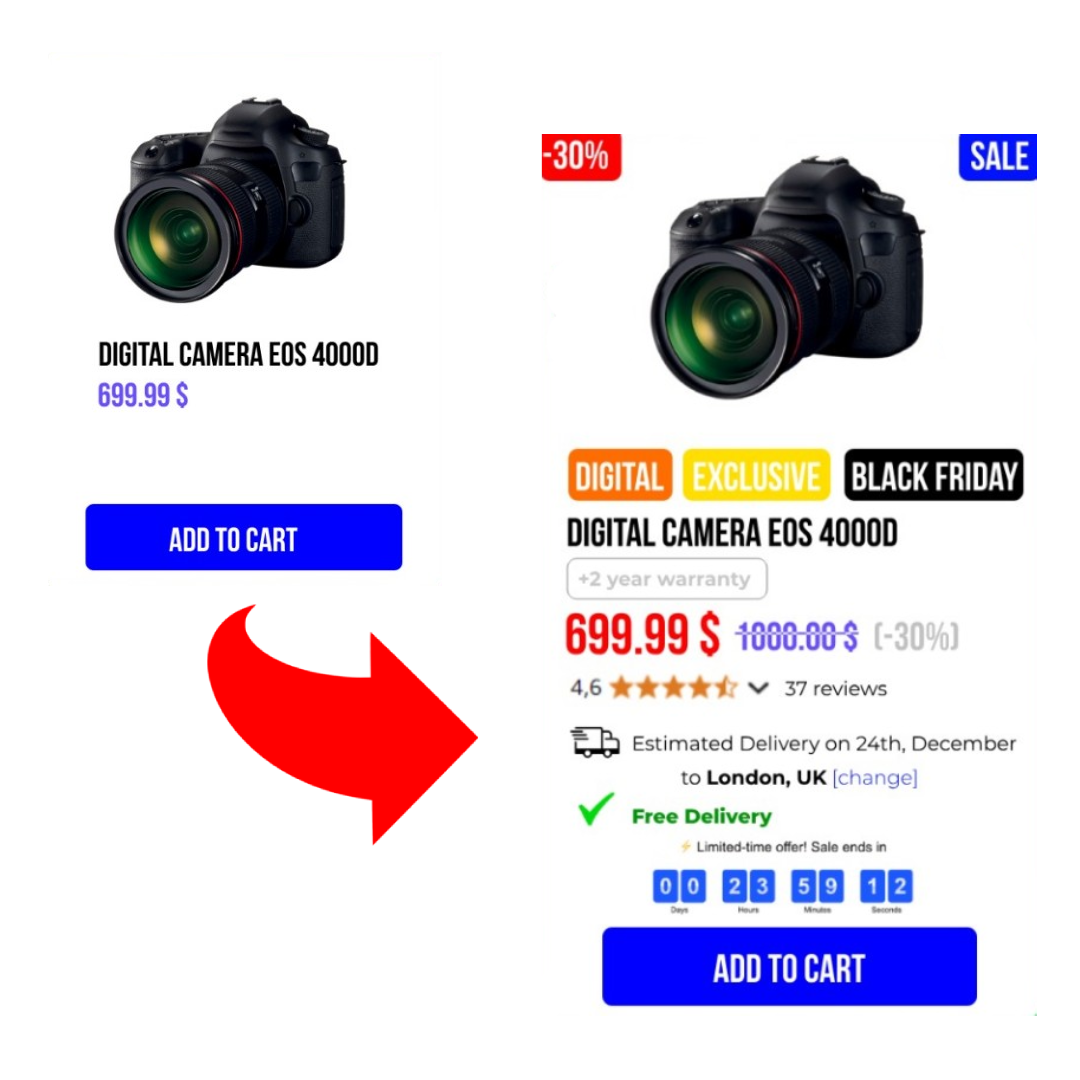
Product visibility is not just about SEO or advertising — it’s also about what happens on your product listings, archive pages, and category grids. This is where smart visual cues can dramatically increase your chances of converting visitors into buyers.
In this article, we’ll explore 5 proven, practical ways to make your WooCommerce products stand out — with real-world examples and actionable tips you can implement today.
1. 🎯 Add Product Badges and Labels
Product badges are small visual elements, like icons or text tags, that appear on product images. They grab attention and communicate key information at a glance.
Common Badge Examples:
- 🔥 Best Seller — Builds trust and social proof
- 🆕 New Arrival — Highlights fresh stock
- 🏷️ Limited Stock — Creates urgency
- 🎁 Special Offer — Informs of current promotions
Why Badges Work:
Studies show that well-designed product labels can increase click-through rates by 20-30%, simply by making products visually pop on archive and category pages.
Real Example:
Imagine browsing a fashion store — you’re far more likely to click a product labeled “50% Off” or “Bestseller” than one with no visual indicators.
How to Implement:
Plugins like Promo Discounts & Campaigns for WooCommerce allow you to add customizable badges and labels to your products with no coding required. You can target specific products, categories, or conditions (like stock level) with ease.
2. ⏳ Use Countdown Timers for Urgency
Creating a sense of urgency is one of the oldest — and most effective — marketing tactics. Countdown timers show shoppers that time is limited, encouraging them to take action before missing out.
Where to Use Countdown Timers:
- On sale products
- During flash sales or seasonal offers
- On product tiles in your store grid
- Even on category or landing pages
Why They Work:
A visible countdown:
- ✔ Creates FOMO (Fear of Missing Out)
- ✔ Boosts perceived value of the offer
- ✔ Increases conversions by tapping into buyer psychology
Real Example:
During a “Weekend Flash Sale”, displaying a 48-hour countdown next to eligible products can lead to a spike in sales, especially from mobile shoppers who make quick decisions.
How to Implement:
Promo Discounts & Campaigns lets you add eye-catching countdown timers to your WooCommerce products — fully customizable and easy to apply to selected products or entire campaigns.
3. 💸 Highlight Discounts Clearly
Too often, online stores rely on subtle price changes to indicate discounts — expecting customers to notice that the original price is crossed out. Big mistake.
If you want discounts to actually drive clicks and conversions:
- Use visible discount labels, like “20% OFF”, “Save €10”, or “Half Price”
- Place these labels on product images or tiles where they can’t be missed
Real Example:
Large marketplaces like Amazon or AliExpress always display discount percentages prominently — because it works. Your WooCommerce store should follow the same principle.
How to Implement:
With Promo Discounts & Campaigns, you can easily add discount labels based on sale prices or specific rules, helping customers instantly recognize deals.
4. 🚚 Add Free Shipping Indicators
Free shipping is one of the biggest purchase motivators for online shoppers.
However, it’s only effective if customers see it before reaching the checkout.
Best Practice:
Add “Free Shipping” badges or icons to product tiles, category pages, or even within product thumbnails to:
- ✔ Increase perceived value
- ✔ Reduce cart abandonment
- ✔ Drive higher conversion rates
Real Example:
A WooCommerce electronics store adds a “Free Shipping” badge to all products over €50 — average order value increases, and fewer carts are abandoned due to unexpected shipping costs.
How to Implement:
Promo Discounts & Campaigns lets you display free shipping badges automatically based on product price, category, or custom rules.
5. 📦 Showcase Delivery Information
In today’s competitive eCommerce environment, customers want transparency about delivery — before they click “Add to Cart”.
Displaying estimated delivery times or “Ships Today” labels:
- ✔ Builds trust
- ✔ Reduces uncertainty
- ✔ Encourages faster purchase decisions
Real Example:
An online fashion retailer shows “Delivered by Friday” on eligible products — resulting in higher conversions compared to products with no delivery estimate shown.
How to Implement:
With Promo Discounts & Campaigns, you can add delivery information directly to product listings, giving buyers the confidence to complete their purchase.
💡 Conclusion: Make Your Products Impossible to Ignore
Product visibility is more than design — it’s psychology. By combining:
- ✔ Eye-catching product badges
- ✔ Urgency-inducing countdowns
- ✔ Visible discounts
- ✔ Free shipping indicators
- ✔ Transparent delivery information
…you create a store experience that guides customers toward making a purchase.
The best part? You don’t need 5 different plugins to do this. With Promo Discounts & Campaigns for WooCommerce, you can manage all these visibility tools in one simple, unified interface.
👉 Ready to Boost Your Product Visibility?
See Promo Discounts & Campaigns in Action →